
AI 供应商设置
在 SnapAct 中配置 OpenAI 兼容的 AI API,并选择提供免费额度的模型服务商。
SnapAct 通过你配置的 OpenAI 兼容 API 来执行 AI 动作(如翻译)。因此你既可以用 OpenAI,也可以用任何提供 OpenAI 兼容 Base URL 的第三方服务商。
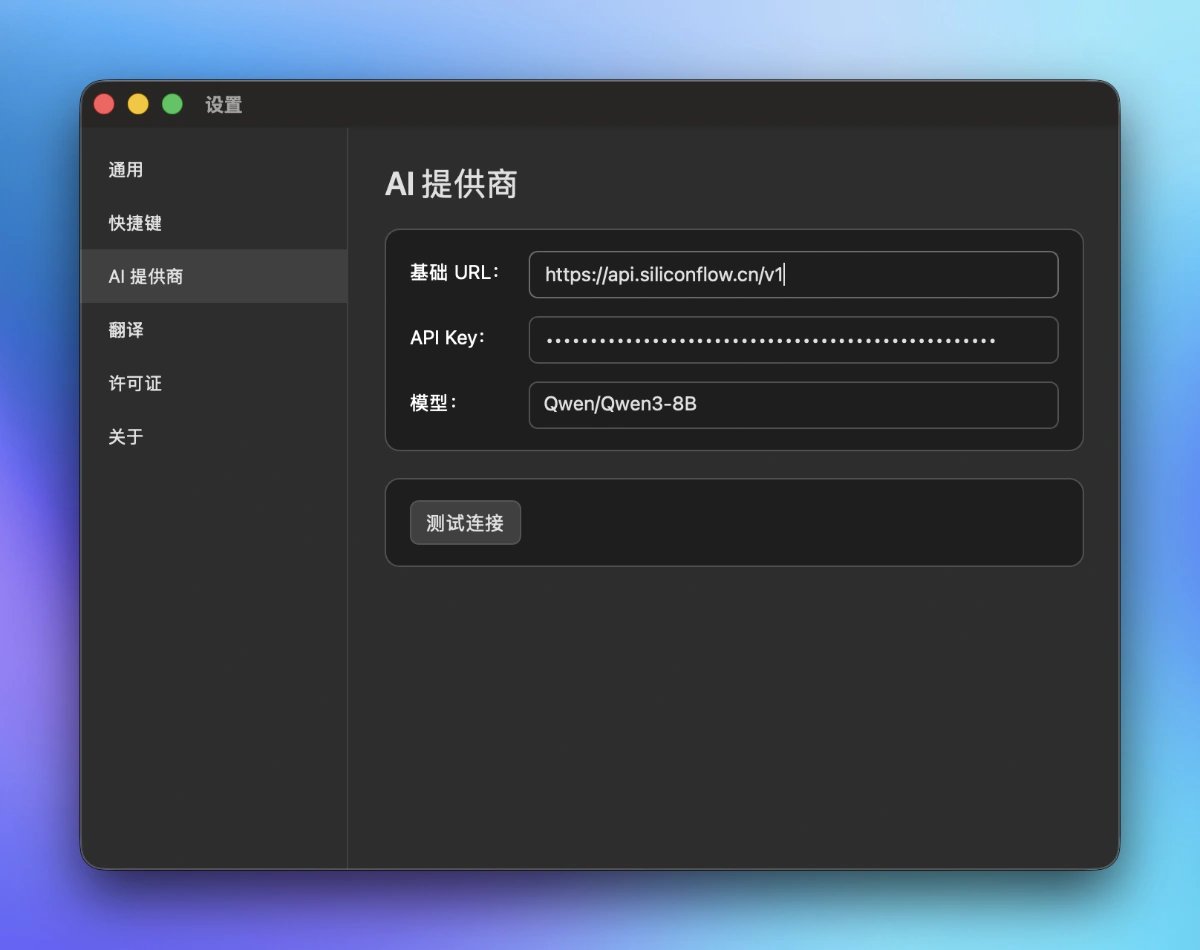
在 SnapAct 中如何配置
- 打开 偏好设置 → AI。
- 填写 API Base URL(例如:
https://api.siliconflow.cn/v1)。 - 填写 API Key。
- 填写 模型名称/ID(不同供应商的模型 id 不同)。
- 保存后,用一段短文本测试翻译。
提供免费额度的供应商(中国优先)
| 供应商 | 推荐免费模型及说明 | Base URL | 链接 | API Key |
|---|---|---|---|---|
| ✅硅基流动 | 多个开源模型长期免费(价格页标注“免费”)。 推荐: Qwen/Qwen3.5-4B、Qwen/Qwen2.5-7B-Instruct、THUDM/glm-4-9b-chat | https://api.siliconflow.cn/v1 | 首页 | API Key |
| 阿里云百炼 | 新人免费额度(部分模型赠送 tokens;有效期以控制台为准)。 | https://dashscope.aliyuncs.com/compatible-mode/v1 | 首页 | API Key |
| 百度千帆 | 实名认证后长期免费调用。 模型: ERNIE-Speed、ERNIE-Lite、ERNIE-Tiny | https://qianfan.baidubce.com/v2 | 首页 | API Key |
| 智谱AI | 免费模型 / 免费额度。 示例: glm-4.7-flash | https://open.bigmodel.cn/api/paas/v4 | 首页 | API Key |
| Moonshot AI | 新用户赠送 credits(数量可能调整)。 | https://api.moonshot.cn/v1 | 首页 | API Key |
| 腾讯混元 | hunyuan-lite 免费;可能赠送 tokens(以控制台为准)。 | https://api.hunyuan.cloud.tencent.com/v1 | 首页 | API Key |
| 讯飞星火 | Spark Lite 永久免费(其他档位以控制台为准)。 | https://spark-api-open.xf-yun.com/v1 | 首页 | API Key |
其他提供免费额度的供应商
| 供应商 | 推荐免费模型及说明 | Base URL | 链接 | API Key |
|---|---|---|---|---|
| ✅OpenRouter | 多个 :free 模型。示例: deepseek-r1:free、llama-3.1-70b-instruct:free、gemini-2.5-flash:free | https://openrouter.ai/api/v1 | 首页 | API Key |
| Groq | 开源模型免费额度。 | https://api.groq.com/openai/v1 | 首页 | API Key |
| Google AI Studio | Gemini 免费 tier(OpenAI 兼容端点)。 | https://generativelanguage.googleapis.com/v1beta/openai | 首页 | API Key |
| Mistral AI | 有免费额度 / 免费试用(视地区与活动而定)。 | https://api.mistral.ai/v1 | 首页 | API Key |
| Cerebras | 可能提供免费 token 配额。 | https://api.cerebras.ai/v1 | 首页 | API Key |
| Together AI | 开源模型免费额度 / 免费试用。 | https://api.together.xyz/v1 | 首页 | API Key |
| Fireworks AI | 部分开源模型免费试用。 | https://api.fireworks.ai/inference/v1 | 首页 | API Key |
| Replicate | 注册赠送 credits,但 非 OpenAI 兼容(不建议用于 SnapAct)。 | https://api.replicate.com/v1 | 首页 | API Key |
备注
供应商的免费额度与模型列表可能会有变化,请以供应商网站信息为准。本文档信息可能更新不及时。