
Hotkeys
Configure global hotkeys and understand conflicts and reserved shortcuts.
SnapAct runs in the tray and listens for global hotkeys.
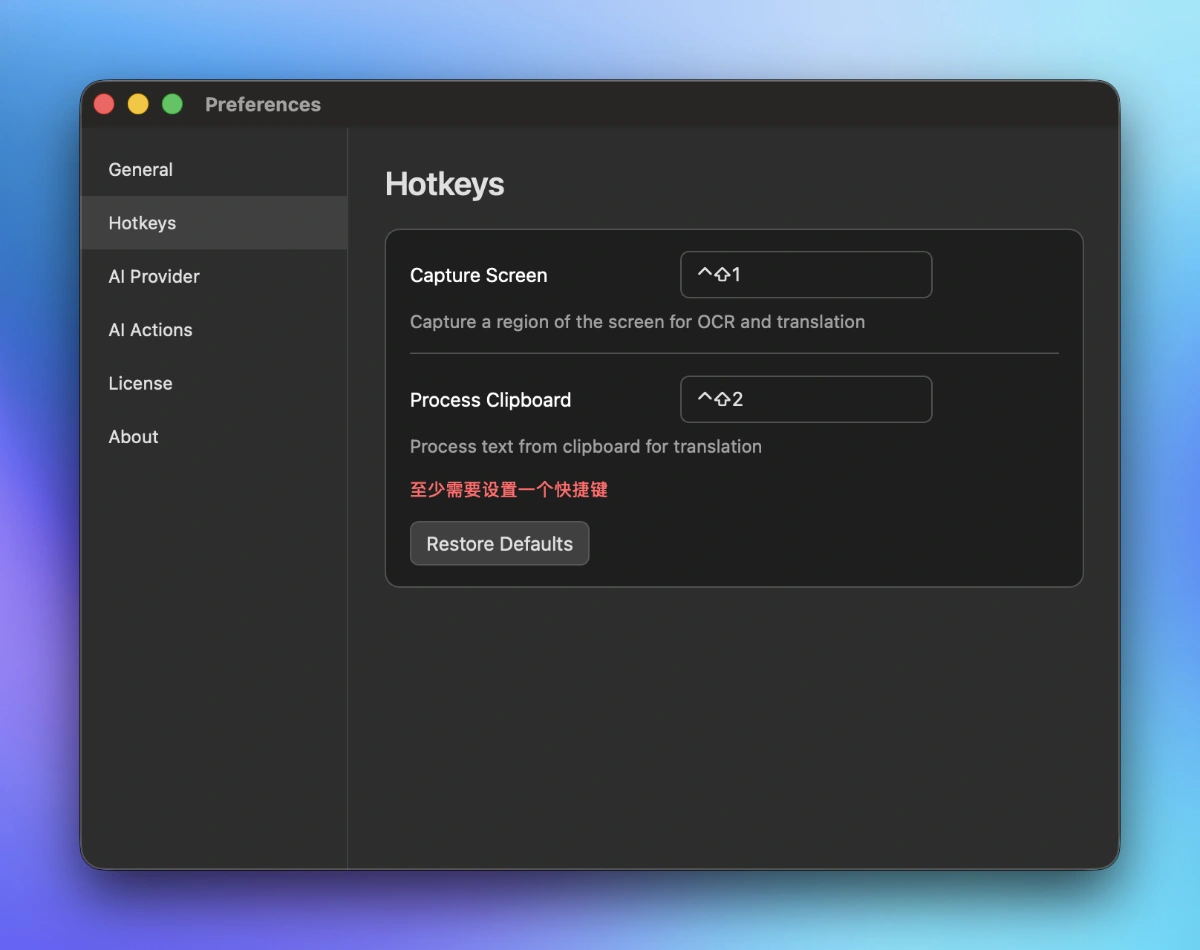
Default hotkeys
- Capture Screen
- macOS:
Cmd+Shift+1 - Windows:
Ctrl+Shift+1
- macOS:
- Process Clipboard (Text)
- macOS:
Cmd+Shift+2 - Windows:
Ctrl+Shift+2
- macOS:
What each hotkey does
- Capture Screen: capture a region of the screen, run OCR if needed, then run the default AI action (translation by default).
- Process Clipboard (Text): read text from your clipboard and run the default AI action (translation by default).
How to edit hotkeys
Open Preferences → Hotkeys, then click a hotkey field and press the new key combination.
Conflicts & validation
SnapAct prevents common problems when saving hotkeys:
- At least one hotkey must be set.
- A hotkey must include a modifier key (Ctrl/Cmd, Alt, or Shift).
- Two actions cannot use the same hotkey. If you set the same hotkey for both actions, SnapAct keeps the one you just edited and clears the other, then shows a warning.
- Hotkeys that match common system shortcuts are rejected (copy/paste/cut/select all/undo/redo/print/close/quit/save).
Restore defaults
Click Restore Defaults to reset the hotkeys back to the default combinations.